
If you run a service business from one office and serve the towns around it, location pages are probably the first thing someone told you to build. They work. I have seen them bring calls from areas a business never ranked in before.
But I have also seen them pull a perfectly healthy website down. One of those websites was our own client’s, and the mistake was ours.
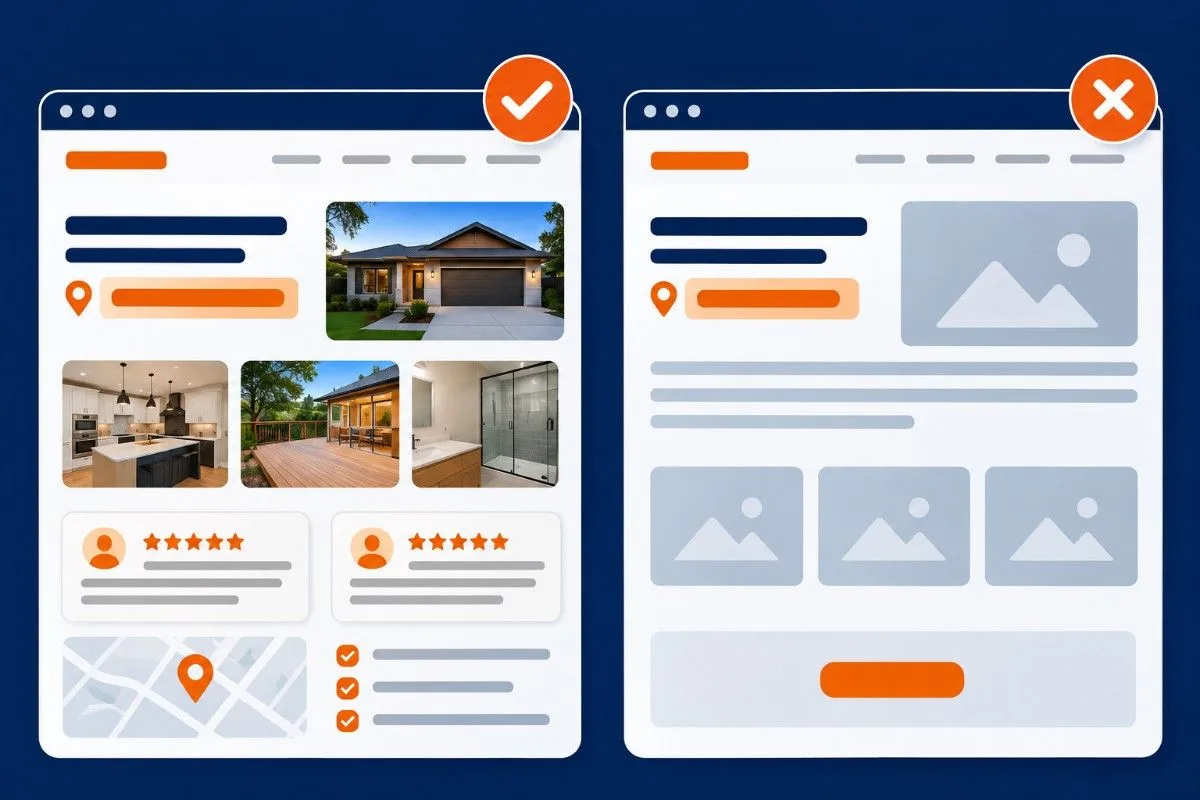
A location page only works when it gives a customer in that area something your other pages don’t: real projects done there, real reviews from people there, pricing and FAQs that fit that area. If the only thing that changes from page to page is the city name, Google can treat it as a doorway page, and that can hurt your whole site, not just those pages.
This guide is for service businesses that work out of one office (sometimes two) and serve many areas. Plumbers, roofers, builders, garage door companies, cleaners, physios doing home visits. I will cover what went wrong for us, the mistakes I find on almost every new client’s site, and exactly how we build location pages now.
Location page vs doorway page: where the line is
A location page tells people in one area what you do for them there. A doorway page exists only to catch a search for that area, then push the visitor to a contact form.
Google lists doorways in its spam policies. Two of its own examples describe most bad location pages I see: pages targeted at specific regions or cities that funnel users to one page, and substantially similar pages that are closer to search results than a clearly defined, browsable hierarchy.
Google also has a separate policy on scaled content abuse, which is mass-producing pages with little value, whether people write them, a template builds them, or AI generates them. Fifty templated city pages can run into both.
| Location page | Doorway page | |
| Content | Specific to that area: projects, reviews, local problems | Same template, area name swapped |
| Images | Photos from jobs done in that area | Same photos on every page |
| Purpose | Helps a customer in that area decide | Exists to rank, then pushes to the form |
| How many | Only areas you can back with proof | As many areas as possible |
| Swap test | Breaks if you change the area name | Still reads fine with any area name |
How our location pages pulled a healthy site down
We were working with a home builder in Melbourne. The site was doing well. Traffic was growing, leads were coming, nothing was broken.
Then we wanted to rank in more suburbs. So around November and December 2024, we created a set of location pages. And here is the mistake: the content was basically the same on every page. We changed the headings, swapped the suburb name, reworded a few lines, and published.
That is when the traffic started falling.
We tried everything we knew. It took more than six months just for the fall to stop. After that, it started recovering, but very, very slowly.
To be fair, Google also rolled out the November 2024 core update, the December 2024 core update, and a December spam update in that same window. So I won’t pretend our pages were the only reason. But the pattern was clear enough that we changed how we build location pages for every client after that.
What I took from it: when you publish a bunch of near-identical pages, you don’t just waste those pages. You make Google trust the whole site less. And trust comes back much slower than it goes.
The mistakes I find on almost every new client’s site
When a new local client comes to us, I can usually guess what their location pages look like before I open them.
- Same content, different headings. By far the most common. The H1 says Austin; the next page’s H1 says Round Rock, and everything below it is the same.
- Same photos on every page. If you are a home builder and every suburb page shows the same five houses, that page is not about that suburb.
- Area names stuffed in a block. Twenty or thirty suburbs dumped in the footer or at the bottom of the page. It doesn’t help you rank there. It just makes the page look spammy.
- Thin pages. One paragraph, a phone number, a contact form. Nobody stays on that page, and Google can see that.
- AI pages with no real data. I am not against AI; we use it every day. But AI doesn’t know which jobs you did in that suburb, what you charged, or what that customer said. Give it that data, and it can help you write. Ask it to write 50 city pages from nothing, and you get 50 copies of the same page.
- Fake addresses and virtual offices. It works until it doesn’t. When Google catches it, the Business Profile gets suspended, and getting it back requires real evidence of a real location. If the address was fake, you don’t have that evidence. Google’s guidelines for representing your business are clear on this.
The swap test: my quick check before any page goes live
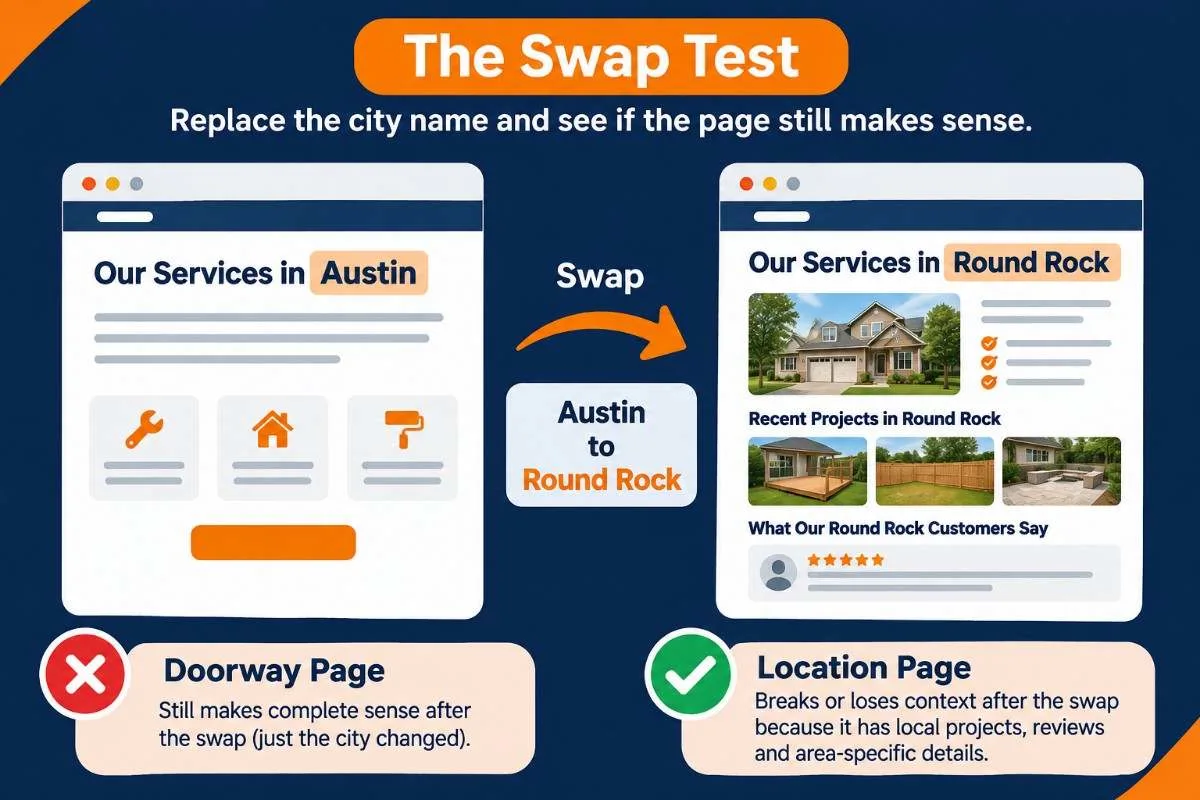
Before we publish a location page now, we do one simple test. Replace the area name with a different area. Read the page again. If the page still makes complete sense, it is a doorway page. Don’t publish it.
A real location page breaks when you swap the name, because it talks about jobs, streets, reviews, prices, or problems that only belong to that area.
We want at least three of these on every location page before it goes live:
- Projects done in that area, with real photos from those jobs
- Reviews from customers in that area
- Pricing or a price range for that area, and what changes it there
- Problems common in that area (older homes, hard water, clay soil, coastal salt air, heavy snow)
- Local rules that affect the job, like permits or council approvals
- How fast you can get there and which days your team covers it
- FAQs that people in that area actually ask
Which areas actually deserve a page
Most people ask how many location pages they should build. That is the wrong question. Ask which areas you can prove you work in.
Here is how we pick:
- Look at where your jobs come from. Pull your invoices or CRM and list the areas with the most jobs and the most revenue.
- Check Search Console. Filter queries that include area names. If people already find you for an area, that area is a strong candidate.
- Check if anyone searches it. Look up “service + area” in a keyword tool. No searches, no page.
- Check your proof. Do you have projects, photos, and reviews from that area? If not, it isn’t ready yet.
Start with your best three to five areas and build them properly. Every other area goes on one “Areas we serve” page, a simple list with a line or two about each. When a new area starts giving you real jobs and reviews, it earns its own page.
City pages or suburb pages?
Start at city level. Go down to suburb or neighbourhood pages only when all three of these are true:
- People actually search using that suburb name
- You have done enough jobs there to show real proof
- The suburb is different enough from its neighbours to say something new
In a big metro like Melbourne or Houston, suburb pages can make sense for your busiest areas. In a small town, one city page is enough. And small nearby suburbs can share one page for the region that names them naturally, instead of five thin pages.
URL structure:
The structure we use for single-office service businesses:
example.com/locations/ (hub page, lists every area)
example.com/locations/austin/ (one page per area)
example.com/locations/round-rock/
For businesses with several services, we add a service page under a city only when that service in that city has real demand and real proof:
example.com/locations/austin/ (parent: every service you do in Austin)
example.com/locations/austin/drain-cleaning/ (child: only for a high-value service)
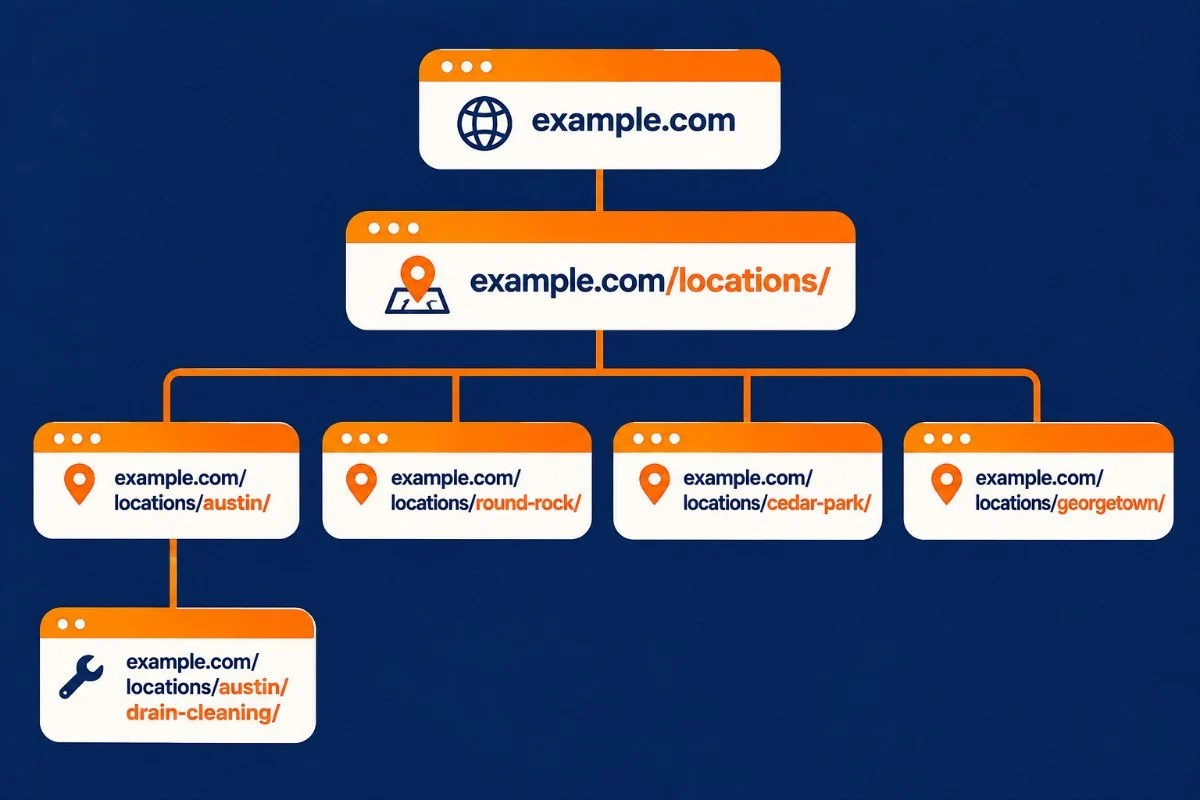
Why we put the city first and not the service (like /plumber/austin/):
- The city page becomes the parent that shows everything you do there, so it collects the links and the authority
- You only create child pages where they are justified, instead of every service times every city
- It is a clean, browsable hierarchy, which is exactly what Google’s doorway policy says real pages should look like
A few rules:
- Short slugs. /locations/austin/ beats /best-cheap-plumber-in-austin-tx/.
- No keyword stuffing in the URL. The page title and content do that job.
- Add the state only when the city name is shared, like Portland or Springfield: /locations/portland-or/.
- Do the maths before you build. Ten services across fifteen cities is 150 pages. If you can’t make 150 pages genuinely different, don’t build 150 pages.
What goes on a location page, top to bottom
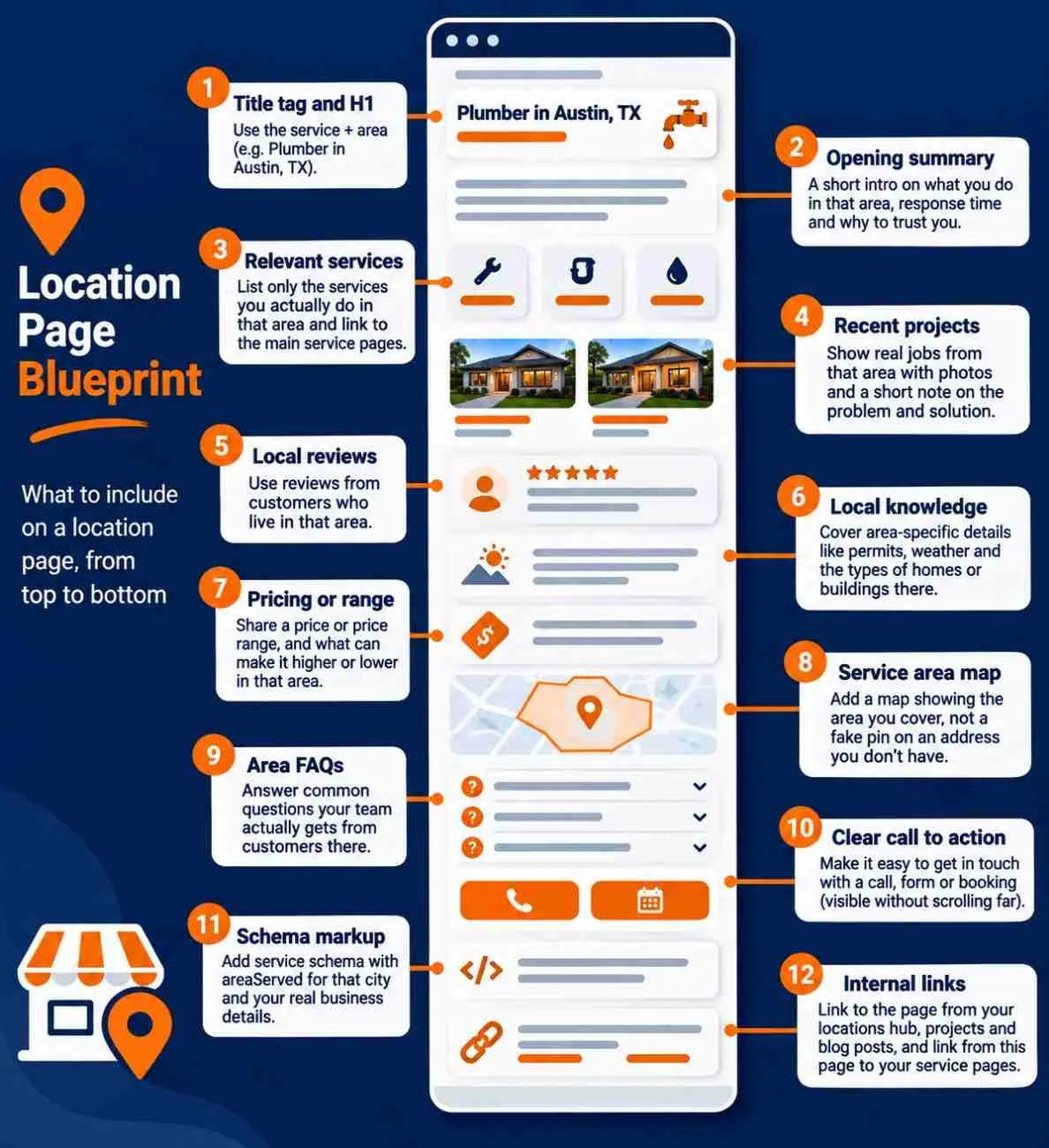
This is the blueprint our team follows.
- Title tag and H1 with the service and area. Example title: Plumber in Austin, TX | Brand Name.
- A two- or three-line opening that answers the visit. What you do in that area, how fast you get there, and why someone should trust you.
- Services you actually do in that area. Not your full list, the ones you really do there. Link each one to its main service page.
- Recent projects in that area. Real photos from those jobs, with one or two lines on what the problem was and what you did.
- Reviews from customers who live in that area. Not the same three reviews you use everywhere.
- Local knowledge. Common problems in that area: permits, weather, and the types of homes or buildings there.
- Pricing or a price range. And what pushes the price up or down in that area.
- A map of the area you cover. Show the service area, not a fake pin on an address you don’t have.
- FAQs specific to that area. Questions your team actually gets from customers there.
- A clear call to action. Call, form, or booking, visible without scrolling far.
- Schema. Service schema with areaServed for that city, and your real business details. I covered the basics in my schema markup guide for local businesses.
- Internal links. Link to the page from the locations hub, from projects and blog posts about that area, and from the page to your service pages. Links inside content are worth more than footer links.
No local reviews for that area yet?
Then show the work instead. Project photos, before-and-after shots, what the job was and what problem you solved. If a customer there is happy to be named, mention them (with permission). Add FAQs and pricing for that area too.
While you wait for reviews from that area, show your overall Google rating and total review count. Then ask your next customers there for a review. My guide on why reviews matter more than ever for AI search covers how to get more of them.
When two location pages compete for the same keyword
If two of your location pages fight for the same search, it usually means they are too similar. Which is the exact problem this whole article is about.
How to spot it: in Search Console, open Performance, click a query, then open the Pages tab. If two location pages both get impressions for that query and keep swapping positions, they are competing.
How to fix it:
- Make each page clearly about its own area in the title, H1, and content
- If two areas are close and the content overlaps anyway, merge them into one stronger page and 301 redirect the other one
- Use the area name in the anchor text when you link to each page, so it is clear which page is for which area
Already have bad location pages? How to fix them
If your site already has templated location pages, don’t panic. This is fixable.
- List every location page. Use your sitemap or a crawler.
- Run the swap test on each one.
- Decide what happens to each page:
- Improve it if you have real projects, photos, and reviews from that area
- Merge it if nearby areas have the same content and nothing different to say
- Remove it and 301 redirect if there is no demand and no proof in that area
- Then leave it alone.
Step four is where most people go wrong. They make changes, see nothing for three weeks, panic, and change everything again. Recovery takes time, just like ranking does. Remember, it took six months just for our client’s fall to stop. Make the right changes once, then give Google months, not weeks.
And if a page is already ranking, don’t rewrite the whole thing. Keep what is working and add the local stuff around it: projects, photos, FAQs. Rewriting everything at once is how pages drop for a while.
How long do location pages take to rank?
For our clients, a properly built location page usually starts ranking in two to three months.
A garage door company we work with in Central Ohio is a good example. Comparing the last three months with the three months before, their site went from 683 clicks to 2,200 and from 71,600 impressions to 267,000. Average position moved from 11.4 to 10.2. Most of that climb came in the last month, which is what we usually see: a slow start, then things pick up once Google trusts the pages.
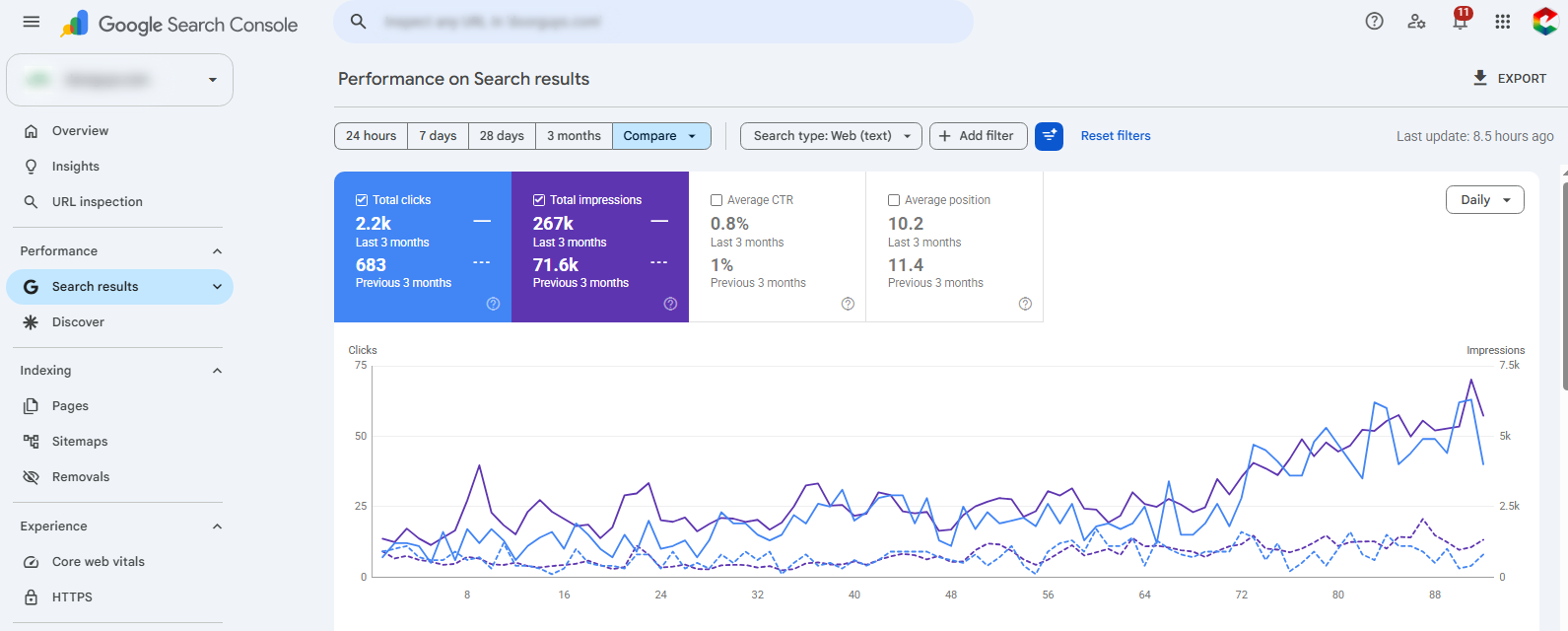
If a page has nothing after three months, run the swap test again. Most of the time, the page is still too generic, or the area simply has no searches.
Do location pages still matter with AI search?
Yes, maybe more than before.
When someone asks an AI tool for the best roofer in their area, it recommends only two or three businesses. To pick you, it needs clear, specific facts: where you work, what you have done there, what customers there say about you. A real location page gives it exactly that. A doorway page gives it nothing it can use.
This is also why local businesses are still in a much better spot than blogs with AI Overviews. I explained this in Local SEO is the last safe zone from AI Overviews.
Questions people asked me about location pages
These came from the comments on my video about location page mistakes.
Can I create a location page for an area where I don’t have an office?
Yes. That is normal for service businesses. Most of them serve many areas without an office in each one, and they show those areas as service areas on their Google Business Profile. The difference is between saying you serve an area and building a page for it. If you build a page, it needs real proof from that area. If you don’t have any yet, keep the area on your service areas page for now.
Can I use the same testimonials on multiple location pages?
Better not. If the same reviews show up on every page, they stop meaning anything. Use reviews from customers in that area. If you don’t have any yet, show projects from there and your overall rating until you do.
Can one page target multiple nearby areas?
Yes, and for small suburbs close to each other, it is often better than five thin pages. One regional page that names the areas you really serve, naturally, not a block of 30 names.
Do I need a page for every area I serve?
No. Build pages for the areas where most of your work comes from, or where you really want to grow. List the rest on one service areas page, and give an area its own page when it starts bringing real jobs and reviews.
Can changing a location page’s content hurt its rankings?
It can, both ways. Adding real local content usually helps. Rewriting the whole page or removing what is already ranking can drop it for a while. Improve around what works, then wait a few weeks before changing anything else.
How many location pages is too many?
There is no magic number. The right number is however many areas you can back with real proof. If you can’t make a page different from the others, that page is one too many.
Build fewer pages, and make each one real
Location pages are still one of the best ways for a service business to show up in the areas it serves. But only when each page is honestly about that area. We learned that the hard way. You don’t have to.
If you want help with your local SEO, you can find more about my work at sawanjha.com.